
Teach so every student can see it
Draw over slides, PDFs, websites and video on any classroom display or online lesson. Free for every teacher. Pro adds text, shapes and a whiteboard.
Download free for WindowsEvery classroom display, every lesson
Whether you're at an interactive panel, a projector or a webcam, the moment you explain something is the moment students need to see it. Epic Pen draws over your slides, PDFs, websites and video — no switching apps, no retyping your material into another tool.
Free for every teacher
Epic Pen Basic is free for everyone — and that includes schools.
Free means free
Basic is free for teachers, students and whole schools — including classroom use. No time limit, no watermark.
Every classroom setup
Interactive panels, projectors, tablets and touchscreens. If it runs Windows, Epic Pen draws on it.
No account needed
Download, install and draw. Students don't need anything installed to see your ink in online lessons.
Built for teaching moments
Mapped to the way you actually teach. Pro tools are marked.
Type the answer on screenPRO
Add labels and worked answers right next to the question — in any colour and size.
Clean shapes for mathsPRO
Straight lines, arrows, ellipses and boxes make diagrams and geometry clear at the back of the room.
A whiteboard mid-lessonPRO
Switch your screen to a whiteboard or blackboard with one click when the lesson needs a blank page.
Ink that tidies itselfPRO
Let marks fade as you go, so you never stop teaching to erase.
Spotlight on big displaysPRO
A bright halo around your cursor so every student can follow along on a big display.
Draw and highlight — free
The pen, highlighter and eraser are free for every teacher, forever.
Works with your lesson materials
Keep your lesson materials exactly where they are — and draw on them.
- PowerPoint
- Google Slides
- OneNote
- Zoom
- Microsoft Teams
- Google Meet
- Canvas
- YouTube
- PDF readers
- Interactive panels
Epic Pen draws over your whole screen, so it works with any app your school uses.
From material to understanding
A typical lesson with Epic Pen.
Open your material
Slides, a PDF, a website or a paused video — anything on your screen is your canvas.
Draw as you teach
Underline, circle and highlight the parts that matter while the class watches.
Switch to the whiteboard
Need a blank page? One click turns your screen into a whiteboard, and one click brings the lesson back.
Share your screen online
Teaching remotely? Share your entire screen and students see every mark.
See it in a lesson
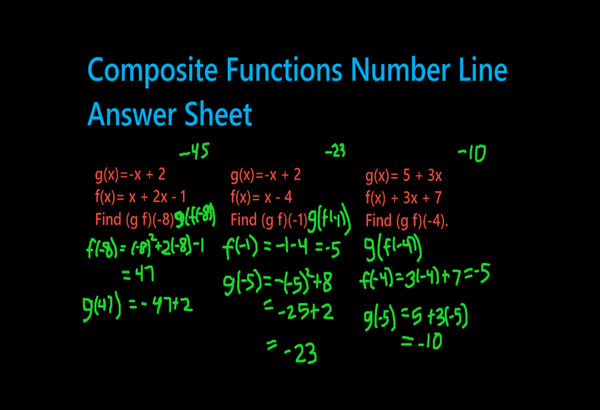
Maths: show your working
Work through each step right under the question, so students see the method, not just the answer.

Geography: label the map
Shade regions, add labels and point to places as you talk — then clear and move on to the next map.

History: tell the story
Draw routes, timelines and connections over any image, so a static diagram becomes a story the class can follow.
Trusted by










I use Epic Pen to annotate graphs and charts during lessons. This allows me to illustrate key points, trends, and data analysis directly on the screen, making complex concepts more understandable for my students.

Epic Pen provides everything a professional needs: drawing and writing tools, fading ink, instant activation of a blackboard/whiteboard, ghost mode to work using only shortcuts leaving the screen free, differentiated stroke size for each tool and more. All this in a fantastic balance between abundance of functions and ease of use.

Epic Pen Pro's versatile color options are invaluable for my work. They allow me to mark specific parts of complex mechanisms with different colors, enhancing the understanding of kinetic architectural designs.
Loved in classrooms and lecture halls
Teachers and lecturers use Epic Pen every day, from primary classrooms to postgraduate seminars.
Free vs Pro for teaching
| Basic — free | Pro | |
|---|---|---|
| Pen, highlighter & eraser | ||
| Screenshot tool | ||
| Colours | 16 | 24 |
| Type answers on screen | ||
| Shapes & angles for maths | ||
| Whiteboard & blackboard | ||
| Fading ink | ||
| Highlighted cursor |
Basic is free for schools and teachers — including classroom use.
Rolling out Epic Pen at your school?
Volume pricing, silent deployment to labs and classrooms, central licence management, and purchase orders and invoices for your business office.
Download & pricing
- Pen, highlighter & eraser
- Screenshot tool
- Hotkeys & Ghost Mode
- Pen pressure & multi-touch
- 16 colours
- Text tool
- Shapes & arrows
- Whiteboard & blackboard
- Fading ink
- Highlighted cursor
Pro
The tools professionals use every day.
--- / month
Charged annually at --- / year
START FREE TRIALMonthly billing also available at --- / month. Click here for more info.
- Everything in Basic
- No in-app ads
- Text tool
- Shapes & arrows
- Whiteboard & blackboard
- Fading ink
- Highlighted cursor
- 24 colours + any custom colour
- Move your licence between PCs
14-day free trial, then billed yearly. Cancel anytime — Pro stays active until the end of your trial or paid period.
- Everything in Pro
- Volume pricing
- Silent & mass deployment
- Central licence management
- Purchase orders & invoices
- Priority email support
Questions from teachers and schools
Yes. Epic Pen Basic is free for everyone — teachers, students, schools and districts — including classroom use. Pro adds the text tool, shapes, whiteboard, fading ink and the highlighted cursor, with a 14-day free trial, and volume pricing is available for schools.
Yes. Epic Pen works on any display driven by a Windows PC, including interactive flat panels, smartboards and pen displays, with full touch, pen-pressure and multi-touch support on compatible hardware.
No. Your ink is drawn on your screen, so students see it on the classroom display automatically. In online lessons, share your entire screen and every mark comes through — students install nothing.
Epic Pen supports silent installation and command-line activation, so IT can roll it out to labs, classrooms and staff machines without touching each PC. Request a quote and we'll include the deployment guide.
Yes. We can work with purchase orders and invoices for team and organisation purchases. Request a quote with your device count and we'll take it from there.
No. Epic Pen collects no student data — not in the app and not on this website. The app draws on the screen locally and doesn't see or store what's underneath.