
Draw on any trading chart, on any platform
Mark up levels, trend lines and setups over TradingView, MetaTrader, thinkorswim or a live stream, without freezing your screen.
Download free for WindowsNever freeze your chart to draw on it
Platform drawing tools lock your analysis to one broker, clutter your charts and slow you down. Epic Pen draws over any platform — and over streams, replays and screen shares — while the market keeps moving underneath.

Trading drawing tools that work everywhere
Mark up the chart the way you'd mark up a printout — without touching your platform's toolset.
Levels and trend linesPRO
Draw straight lines, arrows and boxes for support, resistance and setups — clean enough to teach from.
Label entries and exitsPRO
Type notes right on the chart: entry, stop, target and the reasoning behind them.
Call it livePRO
Ink that fades by itself keeps fast-moving charts clean during live sessions.
Journal your trades
Screenshot the annotated setup and drop it straight into your trading journal.
Explain the conceptPRO
Flip to a whiteboard to sketch structure, risk and ideas, then flip back to the chart.
Draw and highlight — free
The pen, highlighter and eraser are free — over every platform, for any use.
Works with every platform you trade on
No plugins and no platform lock-in. Your markup moves with you between brokers.
- TradingView
- MetaTrader 4 & 5
- thinkorswim
- NinjaTrader
- Sierra Chart
- cTrader
- Your broker's platform
- YouTube & live streams
Epic Pen draws over your whole screen — if you can see the chart, you can draw on it.
Teach trading live
How trading educators run a live session with Epic Pen.
Pull up the chart
Any platform works — or a student's shared screen, a replay or a live stream.
Mark the setup
Draw levels, zones and arrows while you talk the room through the setup.
Label the plan
Type entry, stop and target right on the chart so nobody mishears a number.
Screenshot and share
Capture the annotated chart for your journal, your Discord or your course material.
See it on the chart
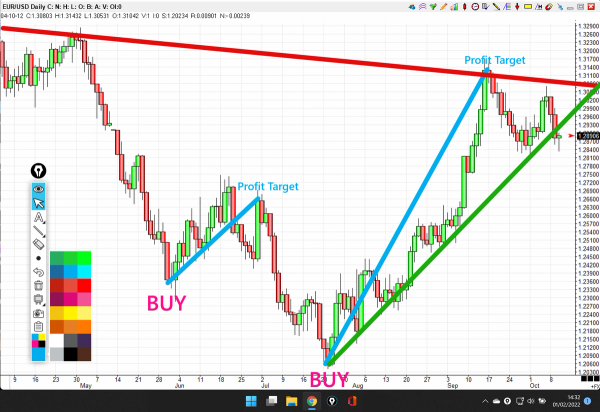
Plan the trade
Draw the trend line, the resistance and the target, and label the entries — right over the live platform.
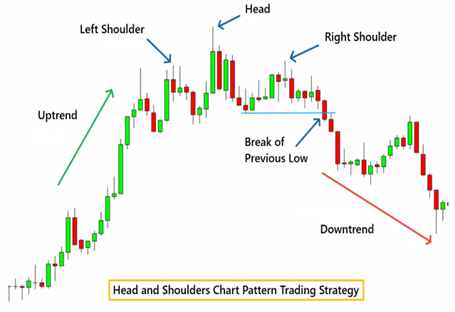
Teach the pattern
Mark the shoulders, the head and the neckline as you explain the pattern, so students see it form.
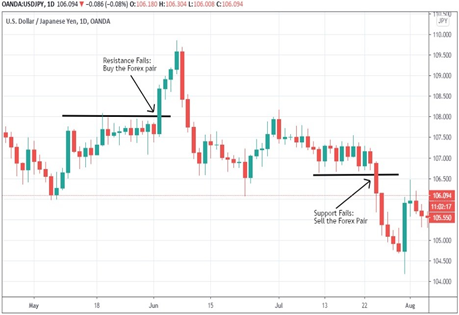
Call the levels
Draw the levels, call the break and screenshot the result for your journal or your community.


Using Epic Pen is a game changer for me. It's like a teacher's aid that gives very clear visual cues to the students watching my classes. It allows me to quickly turn my mouse into a drawing tool with the press of a hotkey and begin annotating and highlighting areas on my screen. My lectures are more detailed and my students are more engaged.

We first discovered Epic Pen in 2020 and since then, we've continued to invest in additional licences due to the exceptional quality of the product. The ability to create advanced drawings on charts, combined with the whiteboard feature, makes it effortless to explain complex scenarios. Additionally, the ease of taking screenshots ensures information can be quickly and effectively shared with our clients.

I am a trader with a successful channel on YouTube and I have realised that Epic Pen is very useful and necessary for any trader, since it allows you to make drawings without freezing the screen.
Used by trading educators every day
Trading educators and full-time traders have used Epic Pen daily for years.
Free vs Pro for traders
| Basic | Pro | |
|---|---|---|
| Pen, highlighter & eraser | ||
| Screenshot for journalling | ||
| Straight lines & arrows for levels | ||
| Text labels on the chart | ||
| Whiteboard & blackboard | ||
| Fading ink for live calls |
Basic is free — including commercial use on your desk.
Rolling out to a trading floor or academy?
Volume pricing, silent install via command line and central licence management for trading floors, prop desks and academies.
Download & pricing
- Pen, highlighter & eraser
- Screenshot tool
- Hotkeys & Ghost Mode
- Pen pressure & multi-touch
- 16 colours
- Text tool
- Shapes & arrows
- Whiteboard & blackboard
- Fading ink
- Highlighted cursor
Pro
The tools professionals use every day.
--- / month
Charged annually at --- / year
START FREE TRIALMonthly billing also available at --- / month. Click here for more info.
- Everything in Basic
- No in-app ads
- Text tool
- Shapes & arrows
- Whiteboard & blackboard
- Fading ink
- Highlighted cursor
- 24 colours + any custom colour
- Move your licence between PCs
14-day free trial, then billed yearly. Cancel anytime — Pro stays active until the end of your trial or paid period.
- Everything in Pro
- Volume pricing
- Silent & mass deployment
- Central licence management
- Purchase orders & invoices
- Priority email support
Questions from traders
Yes. Epic Pen draws over your whole screen, so it works with TradingView, MetaTrader 4 and 5, thinkorswim, NinjaTrader, Sierra Chart and any other platform that runs on Windows — including charts in a browser or on a stream.
Yes. Epic Pen is a live overlay, not a screen capture. The market keeps ticking, your platform stays clickable, and your ink sits on top until you clear it.
No — your ink is drawn on the screen, not anchored to candles, so it stays put when the chart scrolls or zooms. That makes Epic Pen ideal for live explanation, teaching and screenshots. For permanent levels that follow the chart, keep using your platform's own tools alongside it.
Yes. In Zoom or Teams, share your entire screen rather than a single window. In OBS, use Display Capture. Either way, your ink is part of the screen, so viewers see every mark.